Bluesky has become a calm corner of social media, appealing to those who prefer conversations that feel personal and relaxed. It keeps things light but lacks one feature users have been waiting for—the ability to edit posts. If you make a typo or rethink your wording, your only option is to delete and start again. Skeets for Bluesky changes that. This iPhone and Mac app adds an editing feature that feels natural, helping you update your posts without losing their tone or intent.
Skeets for Bluesky doesn’t try to compete with the main app. It’s built with one goal: to edit skeets quickly and smoothly. Once you log in, it displays your recent posts. You choose one, make your changes, and repost. The process takes seconds, and the design keeps everything minimal and clear.
Because Bluesky doesn't yet allow in-app editing, Skeets uses a smart workaround. It removes your original post, uploads the revised one, and places it back in your feed. You don't see lag or disruption—it feels like a seamless update. The flow works well for anyone, whether you're fixing grammar or rewriting a sentence for clarity.
What makes Skeets stand out is how it keeps editing invisibly. You never feel pulled into a technical process. It's quick, quiet, and reliable. For writers, artists, or anyone who treats Bluesky as a creative space, it's a way to maintain control over your words without restarting an entire conversation. It's practical, not flashy, and that's its strength.
The app runs smoothly across both iPhone and Mac. It mirrors Apple's design language, with clean layouts and intuitive gestures. On iPhone, you can scroll through posts, tap to edit, and repost instantly. On Mac, the experience is just as polished, making use of keyboard shortcuts and drag-friendly interactions. You can move between devices effortlessly and keep your posting routine consistent.

Since Skeets connects through the official Bluesky API, it’s safe to use. You don’t need to share extra data or grant unnecessary permissions. It keeps your session private and respects your account. You log in, make your edit, and log out—no clutter, no tracking.
Another quiet advantage is how the app doesn't ask for attention. There are no alerts, ads, or unnecessary add-ons. It's not another social platform trying to pull you in; it's an editor waiting for when you need it. That restraint keeps it light and reliable, which is why it feels like a native part of the Bluesky experience rather than an outside tool.
Bluesky attracts people who enjoy open discussion and creative exchange. But not having an edit option can discourage posting freely. Skeets for Bluesky helps fix that, removing the fear of small mistakes. Whether you post short updates or longer reflections, being able to revise your words makes the platform feel more forgiving.
Other social networks have long debated the idea of editable posts. Some avoid it to preserve authenticity; others add it with restrictions. Skeets takes a simpler view—it trusts users. It assumes you just want to make a small fix or add clarity, not rewrite history. That approach fits Bluesky’s tone perfectly: open, respectful, and user-centered.
For professionals who share creative projects or opinions, this flexibility makes a difference. It turns a post from a snapshot into something living. You can refine your message without breaking a thread or losing engagement. It keeps your posts honest and thoughtful without forcing perfection on the first try.
The presence of Skeets also hints at Bluesky's ecosystem maturing. When third-party developers can build useful tools like this, it shows that the platform is strong enough to inspire outside creativity. It gives users a choice while still keeping things consistent and reliable.
Skeets doesn’t try to be everything. It doesn’t analyze engagement, count impressions, or schedule posts. It edits, nothing more. That simplicity is refreshing. Many apps add layers of features to feel bigger, but Skeets stays focused and fast. It values the user’s time and attention, offering an uncluttered space where editing feels natural and distraction-free.
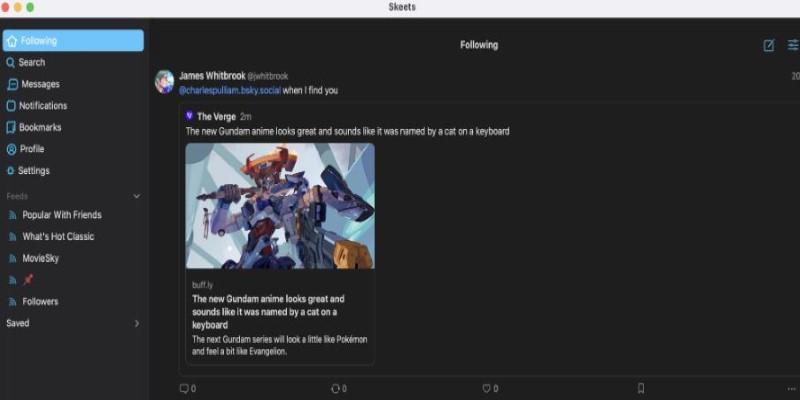
Its interface has no hidden settings or complex menus. Everything is out in the open. You pick a post, edit it, and repost. The lack of distractions makes it easy to trust and use. It doesn’t feel like another platform trying to shape your habits—it respects how you already use Bluesky. This restraint is what makes it fit the Bluesky mindset so well.
The platform has always encouraged open standards and tools, and Skeets echoes that philosophy. It provides a function users have wanted for months without compromising design or privacy. It proves that usefulness doesn't need complexity or excess decoration, showing that good design often means knowing when to stop adding more.
Skeets for Bluesky is a helpful addition to the platform's growing community. It focuses on one thing—editing posts—and handles it with ease. For regular users, it offers a quick fix for small mistakes or changes in thought. For frequent posters, it adds polish and consistency to their writing experience. The app works smoothly across iPhone and Mac, respecting your writing flow without distractions or unnecessary features. While Bluesky may add its own editing option in the future, Skeets already delivers what users have long wanted. It doesn't alter the way you use Bluesky; it simply lets you express your thoughts more clearly and confidently. Sometimes, the simplest tools make the biggest difference every single day.
 TOP
TOP
Get an in-depth look at the new Photoshop iPhone App. We unpack the full feature set, including Generative AI, non-destructive compositing, and seamless Creative Cloud integration for true Mobile Photo Editing
 TOP
TOP
Deciding if upgrading to a paid Dropbox plan is worth the cost? We analyze the features of Dropbox Plus Worth It, including Smart Sync, secure sharing, and advanced file versioning for professionals
 TOP
TOP
Unlock the full potential of YouTube Music. Discover nine hidden features like Smart Downloads, the seamless video toggle, and custom radio builders to transform your listening
 TOP
TOP
Explore the quiet evolution of One UI 8. Discover the refined multitasking, faster AI tools like Audio Eraser, and subtle visual enhancements in the new Samsung software update
 TOP
TOP
Transform your holiday with smart home automations. Create enchanting light shows and Santa sightings that elevate the holiday magic for your kids
 TOP
TOP
How I turned my Boox Palma into a portable word processor for focused, on-the-go writing with minimal distractions
 TOP
TOP
Explore the best gaming laptops of 2025 with high-end graphics, fast refresh rates, and optimized performance for serious play
 TOP
TOP
Discover the best ad blocker tools to improve speed, reduce clutter, and protect your privacy while browsing online
 TOP
TOP
Make your Google Pixel 9a work your way by adjusting key settings that improve performance, layout, and daily use
 TOP
TOP
Boost digital security with 10 practical steps to stay safe online—no need to go offline or give up your digital lifestyle
 TOP
TOP
Discover the best movie showtimes app for iPhone in 2025. Compare features, reviews, and ticket options for your next movie night
 TOP
TOP
Use Android Auto routines to simplify driving. Discover how automation beyond home use improves commutes and road trips
