The modern writer fights a constant war against friction. We convince ourselves that we need the perfect environment to produce words. The Onyx Boox Palma offers a radical alternative to this heavy infrastructure. It is an e-ink device that looks exactly like a smartphone but functions like a sheet of digital paper. It runs Android, fits in a jeans pocket, and has a battery that lasts for weeks. It strips away the notifications, the color, and the blue light, leaving only you and the text.
The biggest barrier to writing is often the physical act of setting up. Pulling a laptop out of a bag, finding a table, and waiting for the OS to wake up creates a mental hurdle. The Palma bypasses this because it lives in your pocket. It is always there.
I found myself writing more frequently simply because the device was accessible during the "dead time" of the day. Standing in line at the post office or waiting for a coffee order usually results in doom-scrolling through social media. With the Palma, those five minutes became a paragraph. The form factor mimics a phone, so you don't draw attention to yourself. You aren't the guy with the laptop open at the bar; you just look like someone texting.
This vertical orientation changes how you draft. The screen is narrow. You only get about five to eight words per line, depending on your font size. This sounds restrictive, but it actually induces a "flow state" faster than a wide monitor. You cannot edit effectively because you cannot see the whole paragraph at once. You are forced to keep moving forward. It mimics the narrow columns of a newspaper or a legal pad, pushing your eyes down the page rather than across it.
While thumb-typing on the virtual keyboard works for quick notes, the Palma transforms into a legitimate workstation when you introduce a Bluetooth keyboard. The device supports standard Bluetooth 5.0, meaning it connects to almost anything instantly.
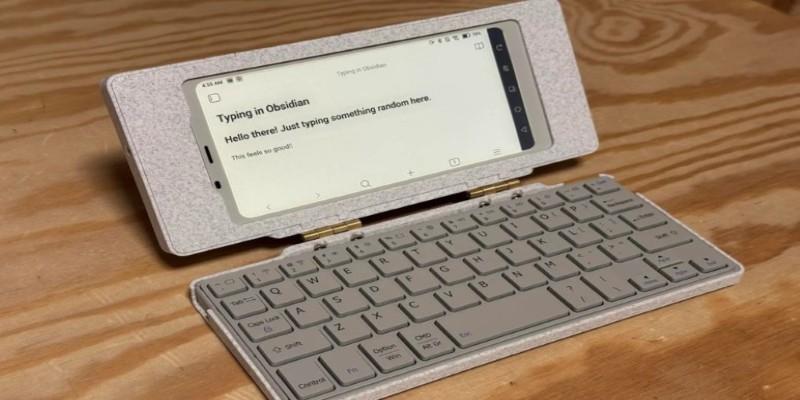
A realistic setup involves a foldable keyboard or a small mechanical board like the NuPhy Air60. You prop the Palma up on a small stand, or even lean it against a coffee mug, and you have a writing rig that weighs less than a hardback book. I have used this setup on train tray tables where a laptop would have been crushed by the seat in front of me.
The software configuration is critical here. Out of the box, e-ink screens struggle with the rapid refresh rate required for typing. The cursor can disappear, or the letters might lag behind your keystrokes. You have to dive into the "E-Ink Center" settings on the Palma and switch the refresh mode to "Ultrafast" or "A2" mode for your specific writing app.
This degrades the image quality slightly, introducing some "ghosting" or faint after-images of previous text, but it makes the response time nearly instantaneous. Once you dial this in, the lag vanishes. You get the tactile satisfaction of a real keyboard with the visual calmness of paper.
Not all Android apps play nice with e-ink. Google Docs, for instance, is heavy. It relies on complex rendering for its toolbars and comments, which can look muddy in grayscale. It works in a pinch, but it isn't ideal. The Palma shines when you use plain text editors designed for simplicity.
iA Writer and Obsidian are the gold standards here. Their high-contrast, monochrome interfaces look stunning on the Palma’s 300 PPI display. iA Writer’s "Focus Mode," which fades out everything except the current sentence, pairs perfectly with the small screen real estate. You aren't fighting UI elements for space.
There is also a distinct advantage to the "dumb" nature of the display. While the Palma runs full Android and can install Instagram or Slack, you won't want to use them. Photos look flat and unappealing in black and white. Videos are choppy. The device naturally discourages you from tab-switching. When you open your writing app, there is nothing else on the device enticing enough to pull you away. It creates a walled garden of productivity without the artificial restrictions of "app blockers." The hardware itself is the block.
It is important to understand what this device is not. It is a drafting machine, not an editing suite. If your workflow involves heavy formatting, tracking changes with an editor, or managing complex footnotes, the Boox Palma will frustrate you.
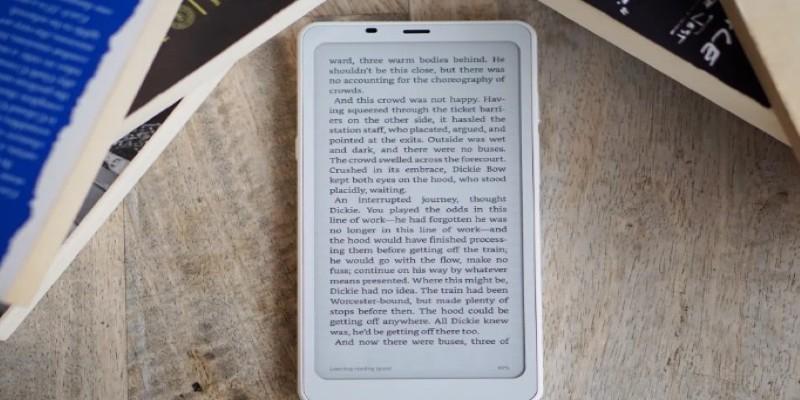
Navigating a 50-page document on a screen the size of an iPhone is tedious. You lack the overview context. Moving blocks of text around requires a lot of scrolling, which can be jarring on e-ink due to the refresh rate. I found that I could churn out 2,000 words of raw text easily, but as soon as I needed to bold headers, insert hyperlinks, or restructure the argument, I had to move the file to a computer.
The screen size also limits your ability to reference other materials. Split-screen multitasking is technically possible on Android, but on a 6-inch screen, it is useless. You cannot have a PDF open on one side and your document on the other. You have to rely on your memory or a separate physical notebook for your research. This is a single-tasking tool.
The Boox Palma is a niche device. For the general user, it is an expensive luxury. For the writer who struggles with the glare of backlit screens or the constant pings of a multifaceted tablet, it is a revelation. It brings the focus of a typewriter into a package that fits in your pocket. It captures the words that usually get lost in the friction of daily life, proving that you don't need a powerful computer to be a prolific writer; you just need a place to put the words.
 TOP
TOP
Get an in-depth look at the new Photoshop iPhone App. We unpack the full feature set, including Generative AI, non-destructive compositing, and seamless Creative Cloud integration for true Mobile Photo Editing
 TOP
TOP
Deciding if upgrading to a paid Dropbox plan is worth the cost? We analyze the features of Dropbox Plus Worth It, including Smart Sync, secure sharing, and advanced file versioning for professionals
 TOP
TOP
Unlock the full potential of YouTube Music. Discover nine hidden features like Smart Downloads, the seamless video toggle, and custom radio builders to transform your listening
 TOP
TOP
Explore the quiet evolution of One UI 8. Discover the refined multitasking, faster AI tools like Audio Eraser, and subtle visual enhancements in the new Samsung software update
 TOP
TOP
Transform your holiday with smart home automations. Create enchanting light shows and Santa sightings that elevate the holiday magic for your kids
 TOP
TOP
How I turned my Boox Palma into a portable word processor for focused, on-the-go writing with minimal distractions
 TOP
TOP
Explore the best gaming laptops of 2025 with high-end graphics, fast refresh rates, and optimized performance for serious play
 TOP
TOP
Discover the best ad blocker tools to improve speed, reduce clutter, and protect your privacy while browsing online
 TOP
TOP
Make your Google Pixel 9a work your way by adjusting key settings that improve performance, layout, and daily use
 TOP
TOP
Boost digital security with 10 practical steps to stay safe online—no need to go offline or give up your digital lifestyle
 TOP
TOP
Discover the best movie showtimes app for iPhone in 2025. Compare features, reviews, and ticket options for your next movie night
 TOP
TOP
Use Android Auto routines to simplify driving. Discover how automation beyond home use improves commutes and road trips
