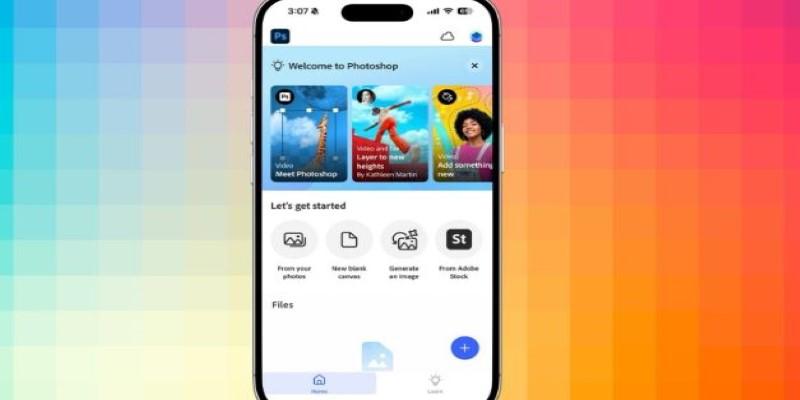
For years, the promise of true Adobe Photoshop power on a smartphone felt like science fiction, a complex, layered beast constrained to a five-inch screen. We’ve seen basic filter apps and watered-down tablet versions, but nothing that truly carried the weight of the Photoshop legacy. That has changed. Adobe has finally delivered an iPhone application that steps beyond simple edits, offering deep compositing, non-destructive workflows, and the startling power of Generative AI.
This release is less about shrinking the desktop interface and more about thoughtfully reimagining professional image-making for the creator who is always moving, proving that high-end editing is no longer tethered to the studio.
The most compelling feature on the iPhone app is not a single tool, but the cohesive application of two core Photoshop concepts: layering and selection. For years, high-quality compositing was the one thing you absolutely had to wait until you got home to attempt. Now, the iPhone app makes this a viable, on-the-spot task with the inclusion of unlimited layers, basic blending modes like Normal and Screen, and robust selection tools. This solves the real problem of creative latency, the delay between capturing an idea and being able to execute on it with real depth.
Consider a small business owner who needs to create an urgent Instagram story. They snap a quick photo of a new product. With the new Photoshop iPhone app, they use the Tap Select tool, which intelligently identifies the foreground object, allowing for an instant, precise isolation mask. They then import a plain white image from their camera roll into a new layer beneath the product. They can adjust the product layer’s brightness non-destructively using an adjustment layer, ensuring the new background doesn't ruin the lighting balance. This all happens within minutes.
The core limitation here is the finicky nature of complex selections on a small screen; while Tap Select is smart, refining the edges of challenging subjects like hair still requires patience and a steady finger, a far cry from the pixel-level precision afforded by a desktop mouse.
No modern Adobe product launch would be complete without a healthy dose of Firefly, and the Generative AI features are front and center. The implementation of Generative Fill and Generative Expand directly addresses the common limitations of mobile photography: poor composition and distracting elements. These AI tools solve the problem of having to compromise on your final image because of a crowded scene or a tight crop.

Imagine a travel photographer who captured a beautiful landscape, but a random tourist walked into the frame. Using the Lasso tool to select the unwanted person, a simple tap of Generative Fill causes the AI to instantly analyze the surrounding environment—the water, the specific texture of the sand—and completely erase the distraction, filling the space with contextually appropriate scenery.
Furthermore, if they cropped the photo too tightly, Generative Expand allows them to "uncrop" the image, using AI to invent new, convincing surroundings that extend the edges of the original photo. The constraint, however, is a very real one: generative credits. Every re-prompt or variation counts against the limited monthly allotment for free and standard paid tiers, often forcing heavy users toward a higher-cost subscription.
The new app’s true utility for professional users lies in its relationship with the broader Creative Cloud ecosystem. This isn't just a solo app; it’s an extension of the desktop workspace. The core problem it solves is the frustrating version control and file-sharing friction that plagues cross-device work. The iPhone app supports cloud documents, meaning a file saved from the desktop version—complete with complex layer groups and Smart Objects—can be opened on the iPhone, edited, and resaved, with changes syncing instantly.
This seamless transition is a massive quality-of-life improvement for designers. A graphic designer might use the desktop version to build a detailed client mood board, saving it as a layered cloud document. While commuting, the client might request a small color change to the logo. The designer opens the file on their phone, navigates to the nested logo layer, and uses the new non-destructive color adjustment tools to quickly modify the hue.
The fidelity of the original PSD is maintained, and the designer avoids the common workflow failure of having to re-implement the change later in the source PSD, which introduces version mismatch headaches. The app also supports the round-tripping of RAW files from Lightroom Mobile, ensuring a high-quality starting point.
Despite the impressive technological strides, the iPhone app maintains a fundamental trade-off: usability versus screen real estate. Adobe has done an admirable job adapting the massive toolset of Photoshop, employing a fluid, contextual UI that reveals deeper options through sub-menus and long-press actions. Yet, for experienced users, the app’s "Select-and-Do" approach, which tries to simplify complex workflows, can feel cumbersome.
The lack of persistent, dedicated panels for things like the History or a comprehensive Histogram forces a change in how professionals work. On the desktop, the history panel is vital for non-linear exploration and quick rollbacks. On the iPhone, you rely primarily on simple undo and redo buttons.
While the core features are present, the necessary menu-diving to access niche tools—like certain advanced blend modes, layer effects, or precise color picker options—breaks the flow that desktop users have internalized over decades. For instance, the cloning and stamping tools, while technically included, are difficult to use with precision on a small, touch-only surface, making them more of a last resort than a primary retouching method.
The new Photoshop iPhone app wisely avoids mimicking the full desktop experience, functioning instead as a powerful companion. It acts as a crucial bridge for cloud workflows, solving the issue of creative friction by enabling professional-grade editing on the go. By focusing on immediate creation, it demonstrates that Photoshop’s true strength lies in its non-destructive, layered workflow. This release successfully brings that sophisticated capability to mobile, offering a potent creative outlet for fleeting moments of inspiration without requiring you to sit at a desk.
 TOP
TOP
Get an in-depth look at the new Photoshop iPhone App. We unpack the full feature set, including Generative AI, non-destructive compositing, and seamless Creative Cloud integration for true Mobile Photo Editing
 TOP
TOP
Deciding if upgrading to a paid Dropbox plan is worth the cost? We analyze the features of Dropbox Plus Worth It, including Smart Sync, secure sharing, and advanced file versioning for professionals
 TOP
TOP
Unlock the full potential of YouTube Music. Discover nine hidden features like Smart Downloads, the seamless video toggle, and custom radio builders to transform your listening
 TOP
TOP
Explore the quiet evolution of One UI 8. Discover the refined multitasking, faster AI tools like Audio Eraser, and subtle visual enhancements in the new Samsung software update
 TOP
TOP
Transform your holiday with smart home automations. Create enchanting light shows and Santa sightings that elevate the holiday magic for your kids
 TOP
TOP
How I turned my Boox Palma into a portable word processor for focused, on-the-go writing with minimal distractions
 TOP
TOP
Explore the best gaming laptops of 2025 with high-end graphics, fast refresh rates, and optimized performance for serious play
 TOP
TOP
Discover the best ad blocker tools to improve speed, reduce clutter, and protect your privacy while browsing online
 TOP
TOP
Make your Google Pixel 9a work your way by adjusting key settings that improve performance, layout, and daily use
 TOP
TOP
Boost digital security with 10 practical steps to stay safe online—no need to go offline or give up your digital lifestyle
 TOP
TOP
Discover the best movie showtimes app for iPhone in 2025. Compare features, reviews, and ticket options for your next movie night
 TOP
TOP
Use Android Auto routines to simplify driving. Discover how automation beyond home use improves commutes and road trips
