The modern internet feels less like a library and more like a chaotic marketplace where everyone is shouting for your attention. You click on a simple news article or a recipe, and suddenly, you are fighting a war against auto-playing videos, newsletter pop-ups, and sticky banners that cover half the text. It is exhausting.
Beyond the visual clutter, there is a hidden layer of data harvesting happening in the background. Installing an ad blocker is not just about aesthetic preference; it is a necessary security measure. Here are the five most effective options available today for cleaning up your digital view.
uBlock Origin is the gold standard for a reason. It is the first extension tech-savvy users install on a new machine, and it is usually the one they install on their parents’ computers to keep them safe.
The interface looks utilitarian, almost ugly, but it offers incredible control for power users. It relies on a "wide spectrum" blocking approach. It doesn't just stop commercial banners; it kills tracking servers and malware domains. A realistic scenario where this shines is on heavy media sites. Visit a tabloid homepage without it, and your laptop fans might spin up as the browser struggles to render a hundred dynamic elements. With uBlock Origin active, the CPU usage drops because the extension effectively strips the page down to its essential content.
There is a significant consideration regarding the browser you use. Google Chrome is currently transitioning to a new extension system called Manifest V3, which limits the capabilities of deep-cleaning blockers like uBlock Origin. Because of this, the developer has created a "Lite" version for Chrome that is less powerful. To get the full, uncompromised experience of uBlock Origin today, it functions best on Firefox. This is a critical distinction for users who want granular control over every script that runs in their tab.
While most tools on this list live inside your web browser, AdGuard offers a standalone application that sits at the operating system level. This allows it to filter traffic before it even reaches your browser. This distinction is vital for users who want to block ads in other places, such as free versions of torrent clients, media players, or other desktop utilities that display banners.

AdGuard excels at "cosmetic filtering." When a standard blocker stops an ad, it sometimes leaves a blank white box or a broken image icon where the banner used to be. It looks messy. AdGuard creates style rules that collapse those empty spaces, making the webpage look as if the ad never existed.
The mobile implementation is particularly strong. On Android, AdGuard can route traffic on the device to filter ads across apps, not just in Chrome or Edge. It solves the problem of mobile game ads that pop up between levels. The trade-off is complexity. For users who want a "scrubbed" internet across their entire machine, the setup time is worth it.
Privacy Badger takes a philosophically different approach to cleaning up the web. It is a project from the Electronic Frontier Foundation (EFF), a non-profit group focused on digital rights. Most blockers rely on "blacklists" maintained by communities—massive text files of known ad servers. If a server isn't on the list, it gets through. Privacy Badger doesn't use lists. It observes behavior.
You can open the Privacy Badger menu and move the slider for that specific video host to yellow (allow cookies but block tracking) or green (allow everything), fixing the site instantly. It is less of a "brute force" ad blocker and more of a surgical privacy tool. It won't block every single static image ad, but it destroys the invisible network of surveillance behind them. It works best when paired with a standard blocker, such as uBlock Origin.
The ecosystem on Apple devices is notoriously restrictive for developers. Safari does not allow extensions to read sensitive page data, which limits how traditional blockers work. 1Blocker was built specifically to navigate these constraints on macOS and iOS. It uses Apple’s native Content Blocking API to tell the browser what to block in advance, rather than trying to intercept traffic as it loads.
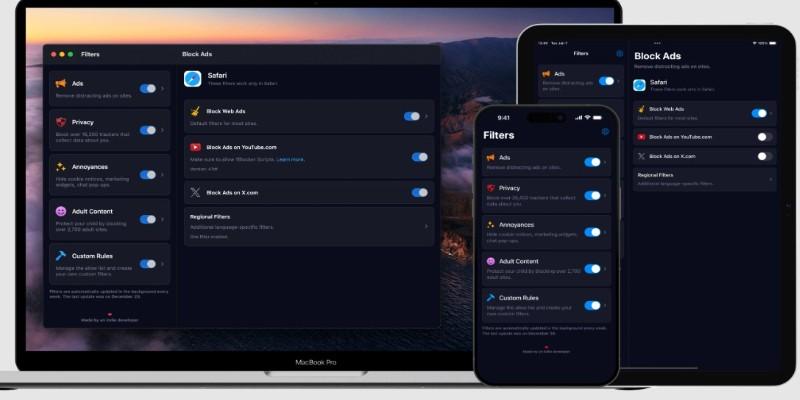
It also solves the in-app tracking problem on iOS through a "Firewall" feature. This creates a dummy profile on the phone. It doesn't route your traffic to a remote server; instead, it loops the traffic locally on the device to strip out tracking requests from other apps. If you play free mobile games that send your device ID to advertising networks, 1Blocker cuts that cord. The limitation is that advanced customization features require a subscription, but for users deep in the Apple ecosystem who want a "set it and forget it" solution, it is the most reliable option.
Ghostery focuses on visibility. While other tools work silently in the background, Ghostery wants you to know exactly who is watching you. When you land on a webpage, the icon displays a badge count of the trackers present. Clicking it reveals a detailed breakdown of the companies involved, categorized by advertising, site analytics, and social media.
There is a historical note to consider. Ghostery was previously owned by an ad-tech company, which caused concern in the privacy community. It has since been acquired by Cliqz (and later WhoTracks.Me contributors), shifting its focus back to consumer protection. Today, it offers a "whitelisting" flow that is easier than most. If you want to support a specific YouTube creator or a favorite blogger, you can pause Ghostery for that specific site with one click.
The internet is a public utility, but the storefronts we visit are messy and aggressive. Using an ad blocker is the only way to navigate these spaces on your own terms. It prevents your device from wasting energy on content you didn't ask for and stops third-party companies from building a dossier of your habits. Whether you choose the raw efficiency of uBlock Origin, the system-wide cleaning of AdGuard, or the Apple-centric optimization of 1Blocker, the result is a web that feels quieter, faster, and surprisingly private.
 TOP
TOP
Get an in-depth look at the new Photoshop iPhone App. We unpack the full feature set, including Generative AI, non-destructive compositing, and seamless Creative Cloud integration for true Mobile Photo Editing
 TOP
TOP
Deciding if upgrading to a paid Dropbox plan is worth the cost? We analyze the features of Dropbox Plus Worth It, including Smart Sync, secure sharing, and advanced file versioning for professionals
 TOP
TOP
Unlock the full potential of YouTube Music. Discover nine hidden features like Smart Downloads, the seamless video toggle, and custom radio builders to transform your listening
 TOP
TOP
Explore the quiet evolution of One UI 8. Discover the refined multitasking, faster AI tools like Audio Eraser, and subtle visual enhancements in the new Samsung software update
 TOP
TOP
Transform your holiday with smart home automations. Create enchanting light shows and Santa sightings that elevate the holiday magic for your kids
 TOP
TOP
How I turned my Boox Palma into a portable word processor for focused, on-the-go writing with minimal distractions
 TOP
TOP
Explore the best gaming laptops of 2025 with high-end graphics, fast refresh rates, and optimized performance for serious play
 TOP
TOP
Discover the best ad blocker tools to improve speed, reduce clutter, and protect your privacy while browsing online
 TOP
TOP
Make your Google Pixel 9a work your way by adjusting key settings that improve performance, layout, and daily use
 TOP
TOP
Boost digital security with 10 practical steps to stay safe online—no need to go offline or give up your digital lifestyle
 TOP
TOP
Discover the best movie showtimes app for iPhone in 2025. Compare features, reviews, and ticket options for your next movie night
 TOP
TOP
Use Android Auto routines to simplify driving. Discover how automation beyond home use improves commutes and road trips
