The 2025 gaming laptop market has shifted from "thin at all costs" to a more practical era. Raw wattage and cooling now rival the importance of the graphics card itself. While Nvidia’s RTX 50-series and AI processors raise the bar, specs alone don't reveal fan whine or chassis durability. You need a machine that refuses to throttle under load and offers a screen comfortable for all-day use. These four picks excel not just in frame rates, but in daily livability and consistent real-world performance.
The Razer Blade 16 stands as the definitive bridge between a high-end gaming rig and a capable professional workstation. The 2025 refresh keeps the familiar CNC-milled aluminum unibody, which still feels denser and more rigid than anything else on the market. It essentially mimics the build quality of a MacBook Pro but packs an Nvidia RTX 5090 inside.
The standout feature here is the display. Razer's implementation of the dual-mode OLED panel allows you to switch between ultra-sharp 4K for content creation and a blistering 240Hz refresh rate for competitive shooters. Unlike previous iterations, where switching modes felt clunky, the 2025 model handles the transition seamlessly. The colors are saturated but accurate, making it equally viable for color grading video footage and exploring open-world RPGs.
There is a trade-off for this density. The chassis gets hot. While the vapor chamber cooling system is efficient, the metal body conducts heat, meaning the palm rest can become uncomfortable during extended sessions if you aren't using an external keyboard. Additionally, the "Razer Tax" is real; you are paying a significant premium for the aesthetics and form factor. It transitions effortlessly from a buttoned-up boardroom presentation to a high-energy LAN party, proving itself as the unrivaled hybrid device.
For years, the 14-inch gaming laptop segment was full of compromises. You either got portability or power, never both. The 2025 Zephyrus G14 breaks that curse by leveraging the efficiency of AMD’s Ryzen AI 9 processors. This chip runs surprisingly cool, allowing Asus to pack serious GPU power into a chassis that slips easily into a standard messenger bag.
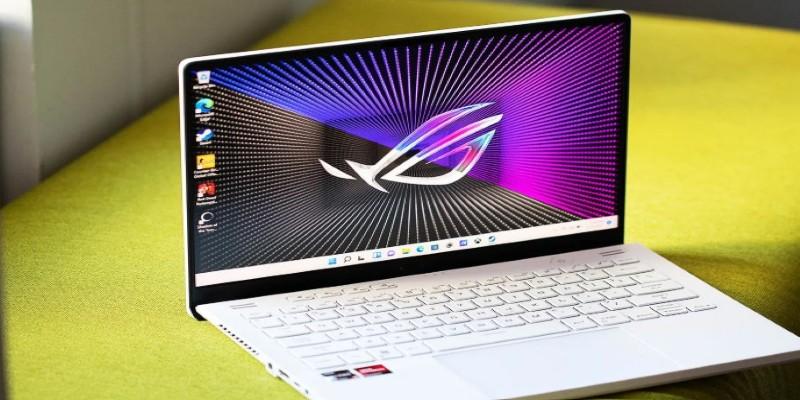
The user experience is defined by the OLED Nebula Display. It offers perfect blacks and near-instant response times, which makes motion clarity in fast-paced games look incredible. Asus has also nailed the input devices. The keyboard has deep travel and a satisfying tactile bump, a rarity in laptops this thin. The trackpad is massive and glass-topped, tracking gestures with precision.
Noise is the main consideration here. To keep the internal components cool in such a small frame, the fans have to spin fast. Under full load, the G14 produces a noticeably high-pitched whine that can cut through quiet game audio. You will want a good pair of noise-canceling headphones. Despite the fan noise, the performance-to-weight ratio remains absurdly good. It serves as the perfect companion for frequent flyers and students demanding local hardware power rather than relying on cloud streaming.
If you don't care about thinness and just want raw, unthrottled frame rates, the Legion Pro 7i is the answer. Lenovo has essentially perfected the "thick" gaming laptop. It doesn't try to hide its nature. It uses a larger chassis to house a massive cooling solution that keeps the Intel Core Ultra 9 and RTX 5080 running at their maximum wattage limits for hours.
The cooling system, Legion ColdFront, uses a vapor chamber and liquid metal thermal compound to move heat away from the chips instantly. In real-world testing, this means the keyboard deck stays surprisingly cool to the touch, even when the GPU is churning out 144 frames per second. The 16-inch display is a 240Hz IPS panel that prioritizes brightness and speed over the infinite contrast of OLED, which makes it less prone to burn-in if you leave static HUD elements on screen for days.
The downside is the brick-like nature of the device. It is heavy, and the power adapter alone adds significant weight to your bag. Battery life is purely theoretical; you might get three hours of office work, but this machine is designed to live plugged into a wall. It is a stationary rig that you can move if you have to, rather than a portable device you carry daily.
Budget gaming laptops usually suffer from poor build quality and abysmal battery life. The TUF Gaming A14 flips the script. It is built to a military-grade durability standard, meaning the plastic chassis feels rugged rather than cheap. There is virtually no flex in the keyboard deck, and the hinge feels robust enough to survive years of opening and closing.
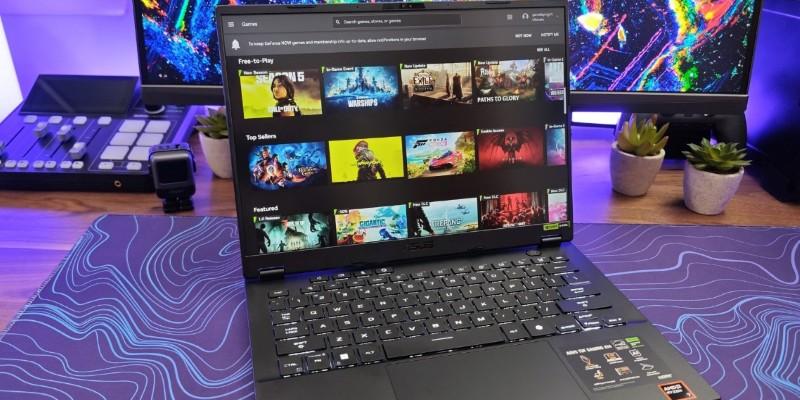
The real shocker is the battery life. Thanks to careful power management and the efficiency of its components, the A14 can genuinely last through a workday of non-gaming tasks on a single charge. This is almost unheard of in the gaming space. For playability, it handles 1080p gaming at high settings with ease, utilizing DLSS 4 frame generation to punch above its weight class.
You do lose some premium flourishes. The screen is a standard IPS panel with decent but not mind-blowing color accuracy, and the speakers are merely functional. However, for the price, it offers a level of reliability and utility that flagship models often miss. It stands as the ideal pick for a reliable daily driver, managing to crush rounds of Call of Duty or Fortnite without melting the chassis.
Choosing the right machine comes down to an honest assessment of your daily routine. It is easy to get seduced by the highest frame rate charts or the thinnest chassis marketing, but those metrics rarely define your long-term satisfaction. Whether you prioritize the sheer horsepower of the Legion or the travel-friendly nature of the Zephyrus, the market in 2025 finally offers enough variety that you no longer have to settle for a machine that fights against how you want to play.
 TOP
TOP
Get an in-depth look at the new Photoshop iPhone App. We unpack the full feature set, including Generative AI, non-destructive compositing, and seamless Creative Cloud integration for true Mobile Photo Editing
 TOP
TOP
Deciding if upgrading to a paid Dropbox plan is worth the cost? We analyze the features of Dropbox Plus Worth It, including Smart Sync, secure sharing, and advanced file versioning for professionals
 TOP
TOP
Unlock the full potential of YouTube Music. Discover nine hidden features like Smart Downloads, the seamless video toggle, and custom radio builders to transform your listening
 TOP
TOP
Explore the quiet evolution of One UI 8. Discover the refined multitasking, faster AI tools like Audio Eraser, and subtle visual enhancements in the new Samsung software update
 TOP
TOP
Transform your holiday with smart home automations. Create enchanting light shows and Santa sightings that elevate the holiday magic for your kids
 TOP
TOP
How I turned my Boox Palma into a portable word processor for focused, on-the-go writing with minimal distractions
 TOP
TOP
Explore the best gaming laptops of 2025 with high-end graphics, fast refresh rates, and optimized performance for serious play
 TOP
TOP
Discover the best ad blocker tools to improve speed, reduce clutter, and protect your privacy while browsing online
 TOP
TOP
Make your Google Pixel 9a work your way by adjusting key settings that improve performance, layout, and daily use
 TOP
TOP
Boost digital security with 10 practical steps to stay safe online—no need to go offline or give up your digital lifestyle
 TOP
TOP
Discover the best movie showtimes app for iPhone in 2025. Compare features, reviews, and ticket options for your next movie night
 TOP
TOP
Use Android Auto routines to simplify driving. Discover how automation beyond home use improves commutes and road trips
