The story of Samsung's One UI 8, based on the latest Android release, is not one of a massive, disruptive overhaul. This update is focused squarely on refinement, taking those clever, half-baked features from previous versions and fully integrating them into the system. It’s a confidence-boosting move; Samsung is solidifying the comfortable, functional experience its users rely on.
The most significant changes are happening beneath the surface, especially in how AI features are being integrated and how the fundamental processes of sharing and multitasking have been improved for daily use. The result is a system that stays out of the way, making the entire Galaxy ecosystem feel more cohesive and natural than ever before.
One UI has always offered strong multitasking, but it often felt rigid, relying on a restrictive 50/50 split that compromised the viewing area of both applications. One UI 8 finally introduces a flexible split-screen view that genuinely enables concurrent work. This is a practical workflow solution, not just a visual trick.
The core improvement is the ability to adjust the split ratio dramatically, allowing one application to shrink down to roughly 10% of the display while the other dominates the rest. Imagine a scenario where a remote worker needs to update a detailed spreadsheet while maintaining a video call. Previously, constant toggling was necessary. With the new 90:10 split, the video conference can remain visible in a narrow, persistent strip, allowing you to track speaker changes and non-verbal cues.
Simultaneously, the majority of your screen is dedicated to the spreadsheet, letting you edit and view data without compromise. This directly solves the problem of context-switching friction; you no longer have to fully obscure one app to effectively use another. A notable limitation is that highly visual or graphically intensive apps still struggle when confined to that small 10% space, but for the bulk of productivity tasks—chat, email, and simple viewers—it’s a major gain.
The integration of on-device AI is maturing, moving past novelty to address concrete user frustrations. Two features that exemplify this are the improved AI Select and the expanded Audio Eraser. AI Select, which allows for instant searching, summarizing, or translation of content circled on the screen, suffered from noticeable latency in the previous generation. That speed issue made the feature feel clumsy. Now, its response time is nearly instantaneous.
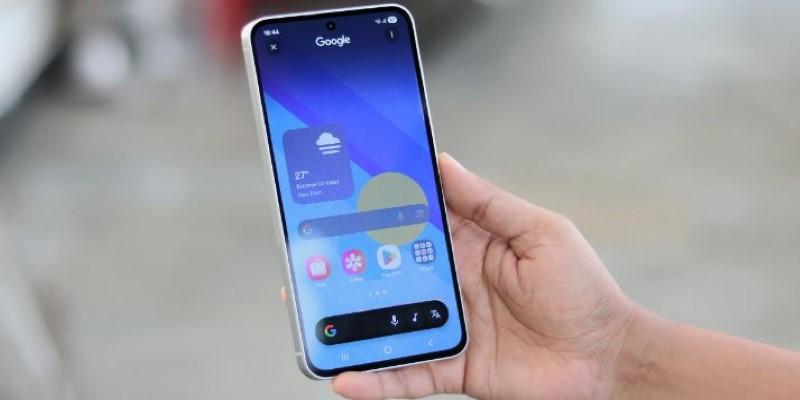
If you are reviewing a long document and need a quick definition of a complex term, you can launch AI Select, circle the phrase, and receive a context-aware result overlaid on the screen in less than a second. This increase in speed transforms the feature from a clumsy gimmick into an effective research aid. Similarly, the Audio Eraser has seen significant expansion. Initially, it was a limited tool for removing ambient noise (like wind or crowds) only within the video editor of the Gallery app. One UI 8 introduces this powerful technology into core apps such as the Voice Recorder and Samsung Notes.
Consider an important interview recorded in a noisy public space; background music and clatter can severely compromise the recording quality for transcription. The enhanced Audio Eraser can now process that original voice memo, dramatically stripping out persistent environmental hums and sharp sounds. While it cannot achieve perfect isolation from a sudden, loud sound, it expertly fixes the common problem of environmental noise pollution, leading to much clearer, more reliable dictated reminders and transcribed notes.
The fundamental workflow of connecting and sharing has been thoughtfully refined, primarily through the new design of Quick Share and the simple integration of Auracast connections. Quick Share, Samsung's proprietary sharing tool, often suffered from a confusing UI when trying to receive files. The new design now separates the process into two distinct, persistent tabs: "Send" and "Receive."
This separation immediately tackles a source of friction. When waiting for a large file—perhaps a high-resolution marketing asset from a colleague—you previously had to navigate menus to ensure your device was in the correct permission state. Now, simply opening the dedicated "Receive" tab makes your device instantly visible and ready, removing the need to manage temporary permissions while others wait.
This minor UI change solves a significant handoff problem in collaborative environments. For audio, an Auracast connection via QR code makes public streaming practical. Instead of complicated Bluetooth pairing for shared audio in public venues like gyms or galleries, users can simply scan a posted QR code. The system still requires a compatible LE Audio device, but the connection process itself is now frictionless.
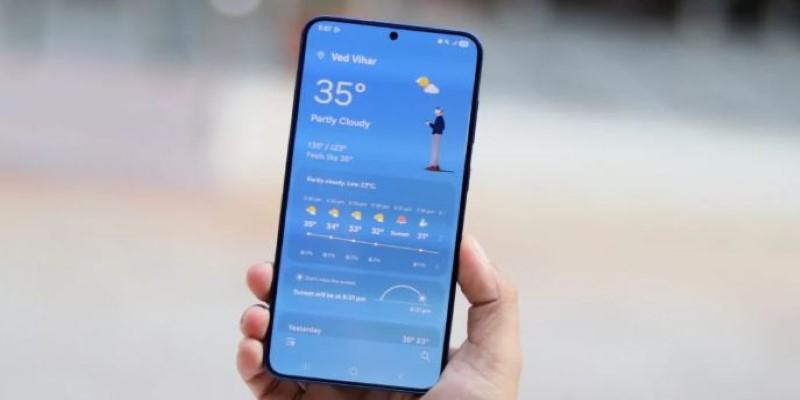
The visual changes are subtle, yet they enhance the feeling of polish and premium quality. The Weather app, often neglected, now features significantly more realistic and detailed visuals that communicate current conditions effectively at a glance. We see similar refinements on the lock screen, where new clock styles dynamically resize and reposition themselves to ensure they do not obscure critical elements of your chosen wallpaper, such as a face or an important object.
For users who rely on automation, the Routines and Modes have been updated with smarter contextual triggers. This allows for niche-relevant automation, such as setting up a reminder to water your outdoor plants that runs at a specific time, checks the local weather forecast, and only executes if there hasn't been meaningful rainfall recently. This advanced conditional logic makes the system feel anticipatory, moving beyond basic time-based actions.
Across the board, the visual language is consistent, with notably smoother animations that eliminate the stuttering sometimes seen when rapidly switching between multiple applications. The entire experience feels more stable and faster, underscoring that One UI 8 is focused on mastering the core user experience rather than introducing revolutionary, unproven features.
One UI 8 excels by systematically resolving existing friction points. This Samsung software update significantly boosts the speed of AI tools, delivers truly flexible split-screen multitasking, and streamlines fundamental processes like file sharing. The release feels deeply considered, offering pervasive polish and subtly making the smartphone experience easier and more intuitive, confirming Samsung’s commitment to functional excellence in One UI 8.
 TOP
TOP
Get an in-depth look at the new Photoshop iPhone App. We unpack the full feature set, including Generative AI, non-destructive compositing, and seamless Creative Cloud integration for true Mobile Photo Editing
 TOP
TOP
Deciding if upgrading to a paid Dropbox plan is worth the cost? We analyze the features of Dropbox Plus Worth It, including Smart Sync, secure sharing, and advanced file versioning for professionals
 TOP
TOP
Unlock the full potential of YouTube Music. Discover nine hidden features like Smart Downloads, the seamless video toggle, and custom radio builders to transform your listening
 TOP
TOP
Explore the quiet evolution of One UI 8. Discover the refined multitasking, faster AI tools like Audio Eraser, and subtle visual enhancements in the new Samsung software update
 TOP
TOP
Transform your holiday with smart home automations. Create enchanting light shows and Santa sightings that elevate the holiday magic for your kids
 TOP
TOP
How I turned my Boox Palma into a portable word processor for focused, on-the-go writing with minimal distractions
 TOP
TOP
Explore the best gaming laptops of 2025 with high-end graphics, fast refresh rates, and optimized performance for serious play
 TOP
TOP
Discover the best ad blocker tools to improve speed, reduce clutter, and protect your privacy while browsing online
 TOP
TOP
Make your Google Pixel 9a work your way by adjusting key settings that improve performance, layout, and daily use
 TOP
TOP
Boost digital security with 10 practical steps to stay safe online—no need to go offline or give up your digital lifestyle
 TOP
TOP
Discover the best movie showtimes app for iPhone in 2025. Compare features, reviews, and ticket options for your next movie night
 TOP
TOP
Use Android Auto routines to simplify driving. Discover how automation beyond home use improves commutes and road trips
