Spotify playlists have always felt personal collections of songs for workouts, late nights, or long drives. But while they told a story through sound, they often looked the same. Most covers were random collages of album art or hastily uploaded images. That’s changed. Spotify now lets you design your own playlist art directly inside the app. No extra apps. No uploads. Just a built-in tool that lets your playlist reflect your taste, both sonically and visually. It's a small shift that makes playlists feel more like something you made—not just something you saved.
This new feature lets users create playlist covers using built-in templates, colors, and text—entirely within the mobile app. Instead of relying on default album mashups or external editing tools, you now have direct access to design your own playlist look with a simple editor that feels like a lightweight design app.
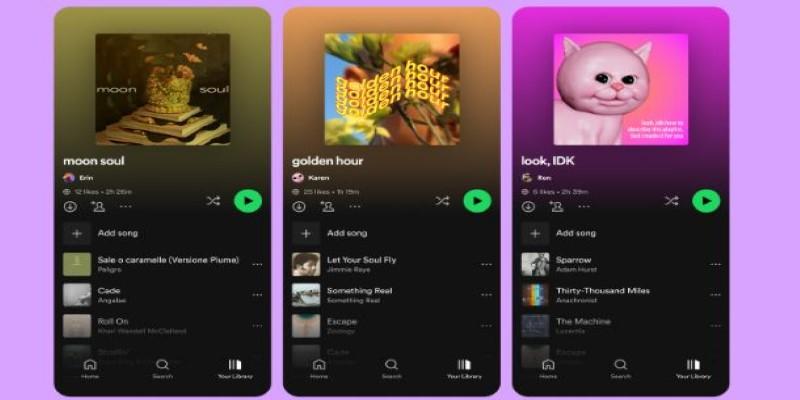
The tool begins with templates—pre-made layouts to give your playlist a foundation. After choosing one, you can add a short title or message. There are a few fonts to pick from and enough placement options to make each one feel unique. The color selections range from bold to muted, including gradients and abstract backgrounds.
Spotify has kept it simple on purpose. This isn't a full design suite. It's made for quick use, especially on mobile. You won't need any editing knowledge to make something that feels thoughtful and personal.
The result is a cleaner, faster way to match your playlist’s artwork to its mood. It’s handy for users who want their music collections to feel more curated, without getting technical.
It may seem minor, but giving people the option to design their own playlist art reflects how digital music has evolved. Listening is no longer passive. It's tied to identity. Playlists are shared with friends, posted in bios, and even used as mood boards. Until now, users could share the sound, but not the look—unless they put in extra effort with third-party apps.
Now, designing your own playlist art is an integrated experience. You choose your tracks and your visuals in the same place, without toggling between apps. This ease of use lowers the barrier between inspiration and creation. You don't have to dig for royalty-free images or worry about image dimensions. You just tap, type, and choose.
It also helps with organization. When your playlists look different, they’re easier to spot in a long list. A bold red cover might mean "workout," while a pale green one signals "study mode." These visual cues make scrolling your library feel less like searching and more like selecting.
Spotify has made playlists more than just containers for music—they’re personal projects. This tool adds a visual layer that matches the emotional one already present in the music.
The playlist art tool is currently available on Spotify's mobile app for both iOS and Android. If you've created a playlist, open it and tap the three-dot menu or the "Edit" button. From there, choose "Edit Cover," and you'll be taken to the new design screen.

First, you pick a layout from the available templates. Each one has a different look—some bold, some minimalist. After that, you enter a title or short phrase. You can adjust its font and alignment based on the template.
Then comes the background. You can scroll through solid shades, soft gradients, or patterned backdrops. You won’t find an overwhelming number of options, but they’re curated to look clean and sharp.
Once you're happy with the design, save it. The cover updates instantly, and you're done. No uploading, cropping, or editing required. The experience is smooth and intuitive, which makes it more likely that users will actually use it.
While it's currently mobile-only, Spotify may extend it to desktop users in the future. For now, most playlist editing happens on phones anyway, so it makes sense to roll it out there first.
Spotify’s new tool fits into a larger trend: turning passive content into something expressive. Features like collaborative playlists, animated Canvas visuals, and live lyrics all point to the same idea—users don’t just want to consume music, they want to shape the experience around it.
Designing your own playlist art strengthens that connection. It makes playlists feel more like personal statements. A playlist for rainy days doesn't need to look like everyone else's. A happy playlist doesn't need a random album collage. Now the look can match the feeling.
This kind of customization also helps Spotify stand out in a crowded market. Competing services offer similar features in terms of music access, but not all let you express yourself in this way. By making visuals easier to control, Spotify appeals to users who see music as part of their aesthetic life, not just their audio life.
And while the current design options are limited, this rollout opens the door for more creative tools in the future. We may see seasonal themes, animated covers, or even playlist stickers. But even in its basic form, this update brings back some of the thoughtfulness people once put into making mixtapes or burned CDs. It adds a layer of care to something that might otherwise feel generic.
Spotify’s new playlist art feature brings a subtle yet personal way to connect more deeply with music. It allows users to reflect their taste visually, not just through song selection. By offering easy tools to create unique covers, Spotify removes the need for outside apps or complicated editing. Everything happens right in the app—quick, clean, and intuitive. Whether you're sharing a playlist or curating one for yourself, the ability to design your own look adds a thoughtful layer to the listening experience. Music speaks for us, and now the visuals can, too—giving each playlist a clearer voice before the first track even starts.
 TOP
TOP
Get an in-depth look at the new Photoshop iPhone App. We unpack the full feature set, including Generative AI, non-destructive compositing, and seamless Creative Cloud integration for true Mobile Photo Editing
 TOP
TOP
Deciding if upgrading to a paid Dropbox plan is worth the cost? We analyze the features of Dropbox Plus Worth It, including Smart Sync, secure sharing, and advanced file versioning for professionals
 TOP
TOP
Unlock the full potential of YouTube Music. Discover nine hidden features like Smart Downloads, the seamless video toggle, and custom radio builders to transform your listening
 TOP
TOP
Explore the quiet evolution of One UI 8. Discover the refined multitasking, faster AI tools like Audio Eraser, and subtle visual enhancements in the new Samsung software update
 TOP
TOP
Transform your holiday with smart home automations. Create enchanting light shows and Santa sightings that elevate the holiday magic for your kids
 TOP
TOP
How I turned my Boox Palma into a portable word processor for focused, on-the-go writing with minimal distractions
 TOP
TOP
Explore the best gaming laptops of 2025 with high-end graphics, fast refresh rates, and optimized performance for serious play
 TOP
TOP
Discover the best ad blocker tools to improve speed, reduce clutter, and protect your privacy while browsing online
 TOP
TOP
Make your Google Pixel 9a work your way by adjusting key settings that improve performance, layout, and daily use
 TOP
TOP
Boost digital security with 10 practical steps to stay safe online—no need to go offline or give up your digital lifestyle
 TOP
TOP
Discover the best movie showtimes app for iPhone in 2025. Compare features, reviews, and ticket options for your next movie night
 TOP
TOP
Use Android Auto routines to simplify driving. Discover how automation beyond home use improves commutes and road trips
