Most people open the Uber app without a second thought, trusting it to get them where they need to go. What often goes unnoticed is how much personal data travels along with every ride — from your location and contacts to stored addresses and payment details. Uber isn’t just tracking trips; it’s learning habits.
The good news is, you don’t have to stop using it to protect your privacy. A few quiet adjustments within the app can make a real difference. By changing the right settings, you can keep Uber convenient while keeping more of your personal life private.
Uber doesn’t just provide a ride from point A to B. Behind the scenes, it’s collecting details like your trip history, payment preferences, saved addresses, and even app usage patterns. The location feature is always active unless manually changed, which means your movements may be tracked even when you’re not using the app.
While Uber claims this data helps improve user experience and safety, it’s also used to shape marketing campaigns and partnerships. Though anonymized, large volumes of this data can still reveal habits. The good news? You can reduce this kind of tracking by changing a few settings in the app.
Start by opening Uber’s app settings and locating the privacy options. The most impactful change you can make is limiting location access. If your phone allows it, set Uber’s location permission to “Only While Using the App.” This way, it stops tracking you in the background when the app is closed.
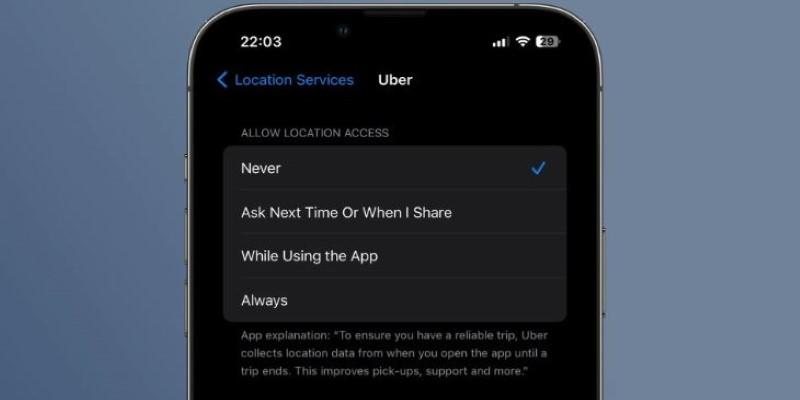
There’s also an option for “Precise Location.” If your device supports it, choose approximate location instead. This still helps Uber locate you for pickups without logging exact coordinates every time. It’s a subtle but meaningful shift in how much the app sees.
Under “Data Sharing,” you’ll find a setting related to marketing and analytics. Disable any permission that allows Uber to share your data with third-party advertisers or partners. This helps reduce how often your habits are used to create promotional content or targeted messages.
Another setting to review is contact access. Uber may request access to your phone’s contacts so you can split fares or share trip updates. If you rarely use those features, it’s better to deny that permission. You can still send ride details manually if needed, without exposing your contact list.
Notifications might seem harmless, but they’re often tied to marketing and behavior tracking. Turn off alerts that aren’t directly tied to trip confirmations or ride arrivals. This reduces unnecessary messaging based on your travel patterns.
Beyond live tracking, Uber stores a detailed history of your activity. This includes addresses you’ve saved under labels like “Home” or “Work.” If you’d prefer those locations not be saved or suggested automatically, you can remove them from the app.
There’s also the option to download a copy of your Uber data. It includes trip history, communication with drivers, device data, and more. Reviewing this file can be eye-opening. If there’s anything you no longer want Uber to keep, you can request a partial or full data deletion through the Privacy Center.
On the payment side, consider using a digital wallet rather than entering card details directly into the app. Services like Apple Pay or Google Pay create encrypted transaction codes, which offer extra protection.
You should also enable two-step verification. This requires a code — sent to your phone or email — whenever you log in on a new device. It’s a small step, but one that keeps your account safer from misuse.
If you’ve ever linked Uber to apps like Google Calendar or Maps, now’s a good time to reassess those connections. These integrations may pass extra data to Uber, including where you’re going or who you’re meeting. Disconnecting them limits that data exchange.
Privacy isn’t just about settings — it’s also about how you use the app. Avoid saving detailed notes under pickup or drop-off locations, especially if they include personal information. These notes are stored and can reveal more than necessary.
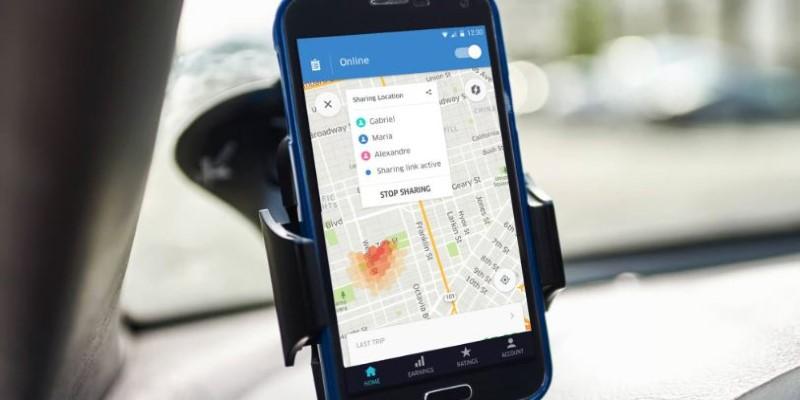
When sharing your ride with someone, use Uber’s “Share Trip Status” button. It’s built into the app and provides a secure, limited window of your location rather than exposing more detailed data through other means.
Avoid booking rides over unsecured public Wi-Fi networks. These connections are easier to exploit and may expose login data. Stick to mobile data or a secure home network when possible.
If you’ve signed into Uber on more than one device, go back and log out from the ones you no longer use. Keeping multiple active sessions increases your exposure, especially if you’ve lost track of where you’ve logged in.
During trips, there’s no need to share extra personal information with drivers. Communication through the in-app chat protects your phone number and keeps things professional. Avoid discussing routines, addresses, or any information that might hint at your daily habits.
When you leave feedback, don’t include anything that could identify you or your schedule. Feedback is reviewed internally, and while helpful, it doesn’t need to include details that tie back to your personal life.
Making Uber more private is less about avoiding the app and more about knowing how to use it with awareness. Most people aren’t aware that many privacy options are already available within the app — they just need to be enabled. From adjusting location settings to removing saved addresses, each step helps you take back a bit more control. Privacy doesn’t need to come at the cost of convenience. With a few minutes of attention, you can use Uber confidently, knowing your information isn’t being tracked more than necessary. Stay aware, and use the app on your own terms.
 TOP
TOP
Get an in-depth look at the new Photoshop iPhone App. We unpack the full feature set, including Generative AI, non-destructive compositing, and seamless Creative Cloud integration for true Mobile Photo Editing
 TOP
TOP
Deciding if upgrading to a paid Dropbox plan is worth the cost? We analyze the features of Dropbox Plus Worth It, including Smart Sync, secure sharing, and advanced file versioning for professionals
 TOP
TOP
Unlock the full potential of YouTube Music. Discover nine hidden features like Smart Downloads, the seamless video toggle, and custom radio builders to transform your listening
 TOP
TOP
Explore the quiet evolution of One UI 8. Discover the refined multitasking, faster AI tools like Audio Eraser, and subtle visual enhancements in the new Samsung software update
 TOP
TOP
Transform your holiday with smart home automations. Create enchanting light shows and Santa sightings that elevate the holiday magic for your kids
 TOP
TOP
How I turned my Boox Palma into a portable word processor for focused, on-the-go writing with minimal distractions
 TOP
TOP
Explore the best gaming laptops of 2025 with high-end graphics, fast refresh rates, and optimized performance for serious play
 TOP
TOP
Discover the best ad blocker tools to improve speed, reduce clutter, and protect your privacy while browsing online
 TOP
TOP
Make your Google Pixel 9a work your way by adjusting key settings that improve performance, layout, and daily use
 TOP
TOP
Boost digital security with 10 practical steps to stay safe online—no need to go offline or give up your digital lifestyle
 TOP
TOP
Discover the best movie showtimes app for iPhone in 2025. Compare features, reviews, and ticket options for your next movie night
 TOP
TOP
Use Android Auto routines to simplify driving. Discover how automation beyond home use improves commutes and road trips
